edit: I stand corrected. The 'require password' setting under Security Preferences didn't change, but other settings do. Yikes
I've upgraded a through a couple versions of OS X on this machine - maybe that makes a difference?
If I remember correctly, one is supposed to make it public once patched or in event of no response, no?
Edit: What is "Responsible Disclosure"[0]?
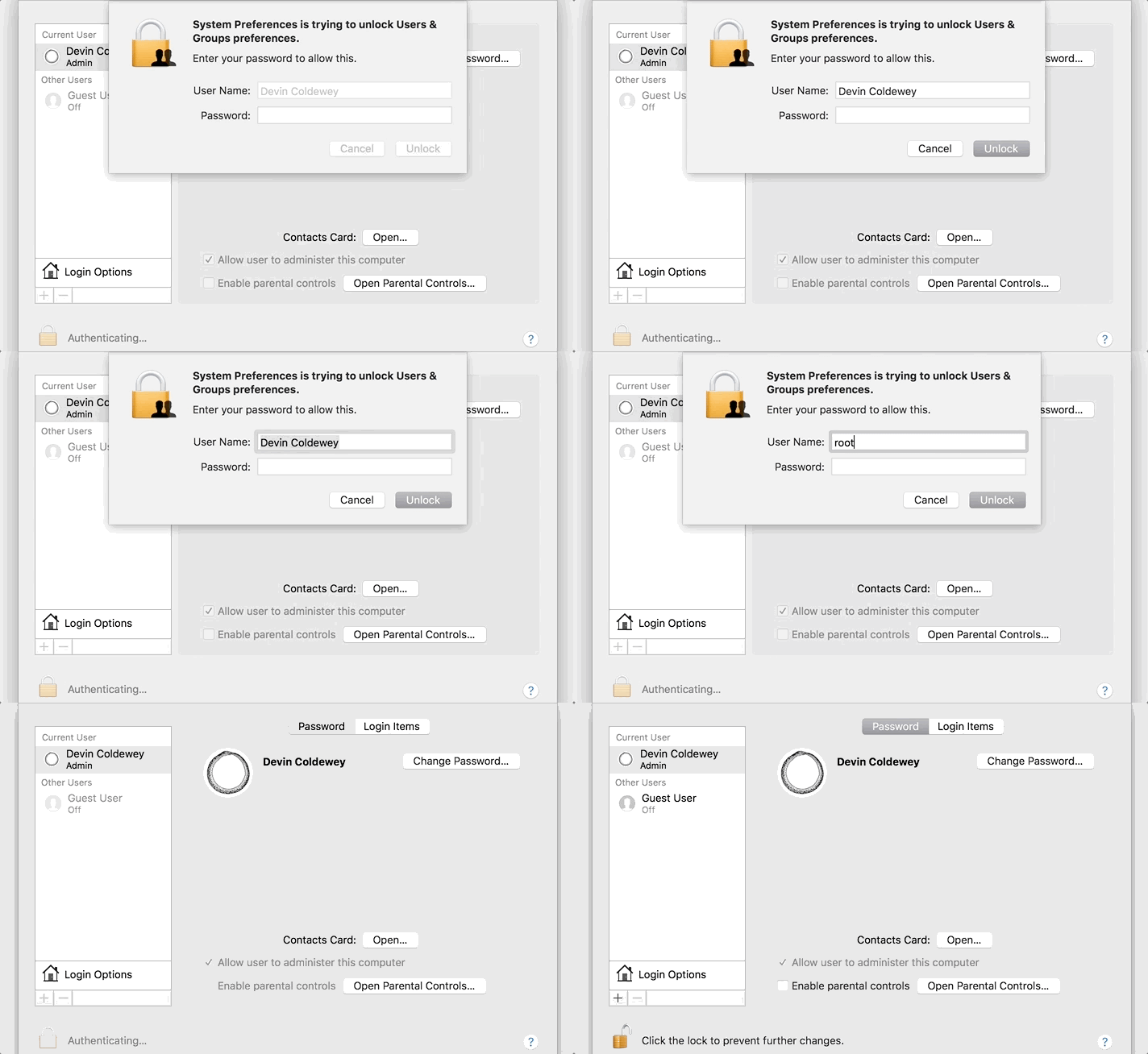
Edit: changing the login method to "Name and password" under login options, then logout and login with "root" with empty password also works.
Fortunately, it doesn't work on cold boot with FileVault enabled, at least it doesn't appear so. `sudo su root` also doesn't work with an empty password.
product-security@apple.com
They also respond to security@apple.com but prefer the product-security address.
Further, there are any number of legit bug bounty programs out there like ZDI that would pay for a bug like this then immediately disclose to Apple for it to be fixed.
Disclosing an 0Day root authentication bypass vulnerability on Twitter isn't cool, even if it is local: think of the impact to shared iMacs on university campuses.
Update: And even after attempting it, checking Directory Utility the root user is still disabled. So I wonder if something 3rd party has enabled the root user and left it passwordless.
Instructions here: https://support.apple.com/en-us/HT204012
System Preferences > Users & Groups > Login Options > Join > Open Directory Utility > Edit > Change Root Password
It seems like root has no password by default. Setting one is enough to close the hole. This is unbelievable!
Curious to see what's in /var/db/dslocal/nodes/Default/users/root.plist before trying this.
Set a good password there and disable the root account again.
Now people making use of this vulnerability will still be able to re-enable the root account (that's why it fail the first time - root is default off, but this bug enables it), but now there will at least be a useful password set.
It seems like the best mitigation for the moment might be to enable the root user and set a password for it.
It looks to me like my root user is disabled.
When I type "root" into the username field and click unlock (in System Preferences > Users & Groups) "root" is replaced with my username and the dialog shakes... I have to type root in each time, but it never unlocks. 10.13.1
Edit: trying it after logging out keeps "root" in the username field, but never logs me in... tried 20+ times
- Open Directory Utility (/System/Library/CoreServices/Applications/Directory Utility.app)
- Authenticate with the lock icon
- From the Edit menu you can enable the root user and set a proper password (it would already be enabled if you had tried out the exploit)
Having that root user enabled isn't great overall, so it would be best to set a reminder to disable it using the same Directory Utility app once the security hole is patched.
Come on Apple you have a quarter trillion dollars in the bank why don't you spend some on improving your software.
It is really ironic that a company, making billions of dollars and branding itself as the leaders of quality, stability and so on, to have this kind of vulnerability.
I have truly lost faith in Apple.
    /etc/pam.d$ grep -RI nullok /etc/pam.d
    /etc/pam.d/authorization:auth       required       pam_opendirectory.so use_first_pass nullok
    /etc/pam.d/checkpw:auth       required       pam_opendirectory.so use_first_pass nullok
/etc/pam.d/screensaver:auth required pam_opendirectory.so use_first_pass nullokIt does not work if you are not admin. It does not work if your root user is enabled and has a password set. If you tried the vuln, you should set a password for the root user ("sudo passwd root").
TechCrunch, if you're reading this... please discourage people from reproducing the bug.
Protect yourself by changing root’s password: ⌘ (Command) + Space, Directory Utility, click the lock and enter your password, Edit -> Change Root Password…, then do NOT disable Root User.
Or open a terminal and do:
sudo passwd1) open Directory Utility app (via Spotlight or other) 2) Click lock to make changes, log in with admin account 2) Click Edit -> Enable Root User 3) Click Edit -> Change Root Password… 4) Set a password 5) Do NOT disable root user!
If you disable the root user, the admin prompt will create it again with an empty password.
This isn't just a snarky comment. They have just released the most awfull iOS upgrade for a long time, and now this. Something's messed up, and they better fix it soon.
I've think i've read somewhere they merged the iOS and macOS teams, i suppose the wrong people were promoted during the operation.
I know testing is hard, but a company with Apple’s resources shouldn’t be making slip ups like this. It suggests some real issues such as lack of unit/automated tests and/or sufficient release testing, which pretty urgently need addressing.
Anyone got any inside scoop?
I initially saw this thinking it didn't affect Sierra or High Sierra.
SELECT * FROM plist WHERE path = "/private/var/db/dslocal/nodes/Default/users/root.plist" AND key = "passwd" AND length(value) > 1;
But I'm breaking my brain trying to figure out how in the hell a login attempt for "root" will enable it if it's disabled. Why is this is a possibility, to just enable root, no questions asked?
I'm guessing it probably would've been a fairly big chunk of change.
They'll not only have to patch the vulnerability but they'll also have to disable all of the root accounts that were inadvertently enabled. What a mess.
Maybe they need to re-think their hiring process, because clearly something is not working as it should.
Until Apple forces me to with a required xCode update for the newest iOS SDK...>.>
2. Add a complex root passphrase and clean this up after the fix is released.
3. Reflect on how irresponsibly this serious security bug was ‘reported’, he didn’t just potentially miss out on $200,000, he put an enormous number of people at risk of local intrusions when instead if it was properly reported there’s a good chance Apple would have released a bug fix for this quicker thus reducing the potential impact and spread of misinformation.
https://en.m.wikipedia.org/wiki/Responsible_disclosure
https://support.apple.com/en-au/HT201220 (See ‘Security and privacy researchers’)
I've two factor authentication on my Apple account and now every time I use a new browser (or after clearing the Cache) and try to log into one of the Apple developer sites it sends me the authentication code to the same machine that I'm using. How is that two factor ?
I've an iPhone which is connected to the same account but it's not my primary phone so it's most likely not ON when I do this. I guess Apple tries to send the code to my phone and when it fails sends to the next online device which happens to be the same machine I'm using to log in. So all I have to do is click Allow and enter the 6 digit code which is displayed in a different app.
After 8 months of living hell using their overpriced MacBook Pro, I'm moving to Surface Pro (running Xubuntu, though).
https://finance.yahoo.com/quote/AAPL?p=AAPL
A higher risk, higher leverage bet: buy some put options the milisecond markets open:
sudo dscl . -passwd /Users/root $(uuidgen)
https://www.reddit.com/r/linux/comments/7hj6v/i_use_my_login...
In this case the bug is so bad and egregious, that publicizing it with the fix might have been the best thing to do -- no telling how many people have already discovered this or how long it would take Apple to fix.
Yes, let's educate each other about what responsible disclosure WITH A DEADLINE TO FIX looks like, but don't assume this person just wanted internet points. And now that the report and a workaround are out there, at least it can be mitigated personally.
Though I imagine there will be some SERIOUS hijinks that result from this until Apple fixes it because it is so easy to do. :(
High Sierra seems to be focused in Emojis. Urghh
https://en.wikipedia.org/wiki/Pyramid_Technology
Here's the email in which I reported it to the staff mailing list.
    Date: Tue, 30 Sep 86 03:53:12 EDT
    From: Don Hopkins <don@brillig.umd.edu>
    Message-Id: <8609300753.AA22574@brillig.umd.edu>
    To: chris@mimsy.umd.edu, staff@mimsy.umd.edu,
            Pete "Gymble Roulette" Cottrell <pete@mimsy.umd.edu>
    In-Reply-To: Chris Torek's message of Mon, 29 Sep 86 22:57:57 EDT
    Subject: stranger and stranger and stranger and stranger and stranger

       Date: Mon, 29 Sep 86 22:57:57 EDT
       From: Chris Torek <chris@mimsy.umd.edu>

       Gymble has been `upgraded'.

       Pyramid's new login program requires that every account have a
       password.

       The remote login system works by having special, password-less
       accounts.

       Fun.

    Pyramid's has obviously put a WHOLE lot of thought into their nifty
    security measures in the new release.

    Is it only half installed, or what? I can't find much in the way of
    sources. /usr/src (on the ucb side of the universe at lease) is quite
    sparse.

    On gymble, if there is a stray newline at the end of /etc/passwd, the
    next time passwd is run, a nasty little "::0:0:::" entry gets added on
    that line! [Ye Olde Standard Unix "passwd" Bug That MUST Have Been Put
    There On Purpose.] So I tacked a newline onto the end with vipw to see
    how much fun I could have with this....

    One effect is that I got a root shell by typing:

    % su ""

    But that's not nearly as bad as the effect of typing:

    % rlogin gymble -l ""

    All I typed after that was <cr>:

    you don't hasword: New passhoose one new
    word: <cr>
    se a lonNew passger password.
    word: <cr>
    se a lonNew password:ger password.
    <cr>
    Please use a longer password.
    Password: <cr>
    Retype new password: <cr>
    Connection closed

    Yes, it was quite garbled for me, too: you're not seeing things, or on
    ttyh4. I tried it several times, and it was still garbled. But I'm not
    EVEN going to complain about it being garbled, though, for three
    reasons: 1) It's the effect of a brand new Pyramid "feature", and
    being used to their software releases, it seems only trivial cosmetic,
    comparitivly.  2) I want to be able to get to sleep tonight, so I'm
    just going to pretend it didn't happen. 3) There are PLEANTY of things
    to complain about that are much much much worse. [My guess, though,
    would be that something is writing to /dev/tty one way, and something
    else isn't.]  Except for this sentence, I will also completely ignore
    the fact that it closed the connection after setting the password, in
    a generous fit of compassion for overworked programmers with
    ridiculous deadlines.

    So then there was an entry in /etc/passwd where the ::0:0::: had been:

    :7h37OHz9Ww/oY:0:0:::

    i.e., it let me insist upon a password it thought was too short by
    repeating it. (A somewhat undocumented feature of the passwd program.)
    ("That's not a bug, it's a feature!")

    Then instead of recognizing an empty string as meaning no password,
    and clearing out the field like it should, it encrypted the null
    string and stuck it there. PRETTY CHEEZY, PYRAMID!!!! That means
    grepping for entries in /etc/passwd that have null strings in the
    password field will NOT necessarily find all accounts with no
    password.

    So just because I was enjoying myself so much, I once again did:

    % rlogin gymble -l ""

    Password: <cr>
    [ message of the day et all ]
    #

    Wham, bam, thank you man! Instead of letting me in without prompting
    for a password [like it should, according to everyone but pyramid], or
    not allowing a null password and insisting I change it [like it
    shouldn't, according to everyone but pyramid], it asked for a
    password. I hit return, and sure enough the encrypted null string
    matched what was in the passwd entry. It was quite difficult to resist
    the temptation of deleting everyone's files and trashing the root
    partition.

        -Don

    P.S.: First one to forward this to Pyramid is a turd.
To me personally 10.6.8 + Security Updates + APFS is extremely close to the ideal operating system.
- Can be mitigated by enabling the root user with a strong password
- Can be detected with `osquery` using `SELECT * FROM plist WHERE path = "/private/var/db/dslocal/nodes/Default/users/root.plist" AND key = "passwd" AND length(value) > 1;";`
- You can see what time the root account was enabled using `SELECT * FROM plist WHERE path = "/private/var/db/dslocal/nodes/Default/users/root.plist" WHERE key = "accountPolicyData";` then base 64 decoding that into a file and then running `plutil -convert xml1` and looking at the `passwordLastSetTime` field.
Note: osquery needs to be running with `sudo` but if you have it deployed across a fleet of macs as a daemon then it will be running with `sudo` anyway.
Interesting...
Also the UX is different. Typing root on the fresh installed one fails, then resets the user text box to my name, and if I type root again it doesn't let me it.
On the upgraded laptop, if I type root, it sticks and clicking unlock twice gets me in.
https://images-na.ssl-images-amazon.com/images/I/51I4nsyt9AL...
"We are working on a software update to address this issue. In the meantime, setting a root password prevents unauthorized access to your Mac. To enable the Root User and set a password, please follow the instructions here: https://support.apple.com/en-us/HT204012. If a Root User is already enabled, to ensure a blank password is not set, please follow the instructions from the ‘Change the root password’ section."
https://techcrunch.com/2017/11/28/astonishing-os-x-bug-lets-...
"Oh, good boy. Thanks for the responsible disclosure. You're sure you haven't told ANYONE else about this? Great! Keep it that way and we'll send you a big check real soon. Promise!"
Coordinates acquired.
Boom.
Keep in mind, Apple was caught working directly with NSA in Snowden disclosures. The US government will drone strike people outside the US without trial or charges. Apple illegally SWATed a Gizmodo reporter over a leaked iPhone prototype.
I don't blame this Turkish national, not one bit.
Password change is the only protection until it is patched.
https://forums.developer.apple.com/thread/79235
Screenshot. http://oi67.tinypic.com/2h6embp.jpg
While Apple works on its fix, it offered a workaround for users concerned about the bug.
“Setting a root password prevents unauthorized access to your Mac,” the company explained.
"To enable the Root User and set a password, please follow the instructions here: https://support.apple.com/en-us/HT204012.
---
Edit - for me those Apple instructions didn't work. This seemed to:
Search for 'Directory Utility' in Spotlight and click it.
Click the lock to make changes
Select 'Enable root user' from 'Edit' on the main menu and set a password.
The replies to this tweets are all everyones snarky comments to the @AppleSupport account or their edgy 'hot takes' on the issue. @AppleSupport responded promptly - albeit obviously out of their depth, and a bunch of people couldn't help but make fun of this fact. It's almost like tweeting to Apple's customer support account is not the best way to report a vulnerability?
Responsible disclosure has a proven history of working. When the vulnerability is appropriately patched and disclosed to the public, there is still a lot of backlash. You only need to look at the recent responsibly disclosed vulnerabilities for proof of this. Instead, we have a bunch of armchair analysts—who don't at all seem to be driven by past occurrences / existing data in any way—claiming that it didn't work.
https://forums.developer.apple.com/thread/79235
(spotted by https://twitter.com/fristle/status/935670476214378496)
Disabling root re-enables the blank password to root.
``` dsenableroot ```
utility; by first enabling the root user with a strong password, then disabling it with the
``` dsenableroot -d ```
option. It's heavily recommended to not leave the root user enabled.
In the Spotlight Search type "Terminal" and press enter.
At the terminal type "passwd" and press enter.
The terminal will prompt you to change the password for "root".
Do you think a hacker with ill-intent would have reported this issue at all?
"Can someone here explain to me what is the login dialog supposed to do? ... Ok. Then why the !@#% doesn't it do that???"
:/
Kind of ironic that you can easily get elevated privileges with it.
Software quality in macOS was important back when they were trying to get people to switch from Windows-based PCs to Macs. Nowadays, most people who were going to switch have already switched, so Apple has no incentive to keep up the same level of software quality anymore. They just have to keep people locked into their ecosystem (with iPhone etc.) enough that the barrier to switch out again is high enough.
There is no reason for Apple to improve macOS, since doing so won’t make anyone switch to Macs who hasn’t already switched, and not improving macOS won’t make anyone upset enough to switch back. Ergo, Apple leaves macOS to stagnate, and they will keep macOS at this bad-but-not-horrible-enough-to-switch level for the foreseeable future.
That’s my theory, anyway.
1) (Apple) 1 + 2 + 3 = 24 https://news.ycombinator.com/item?id=15538666
2) (Apple) Blank root password https://news.ycombinator.com/item?id=15800676
3) ...
"We are working on a software update to address this issue. In the meantime, setting a root password prevents unauthorized access to your Mac. To enable the Root User and set a password, please follow the instructions here: https://support.apple.com/en-us/HT204012. If a Root User is already enabled, to ensure a blank password is not set, please follow the instructions from the ‘Change the root password’ section."
I'm still on 10.12 Sierra. Long ago I stopped major updating when those releases were new. I learned to wait months or many months for bugs to be dealt with and for older software to be updated to be compatible with the new release. High Sierra provides nothing critical that Sierra does not provide, and thus, I am happy in my position as late adopter.
https://tctechcrunch2011.files.wordpress.com/2017/11/ooooooh...


Comments: